Release updates
Enhancements in Pipesim 2026.2
- Advanced well sensitivity analysis enrichment
- Upgrade of the Olga-S flow model to version 2026.1
- Termination of model support version 2021.2 and older
- Enable emulsion correlations and inversion watercut for Multiflash PVT files
- PythonToolkit improvements
Advanced well sensitivity analysis enrichment
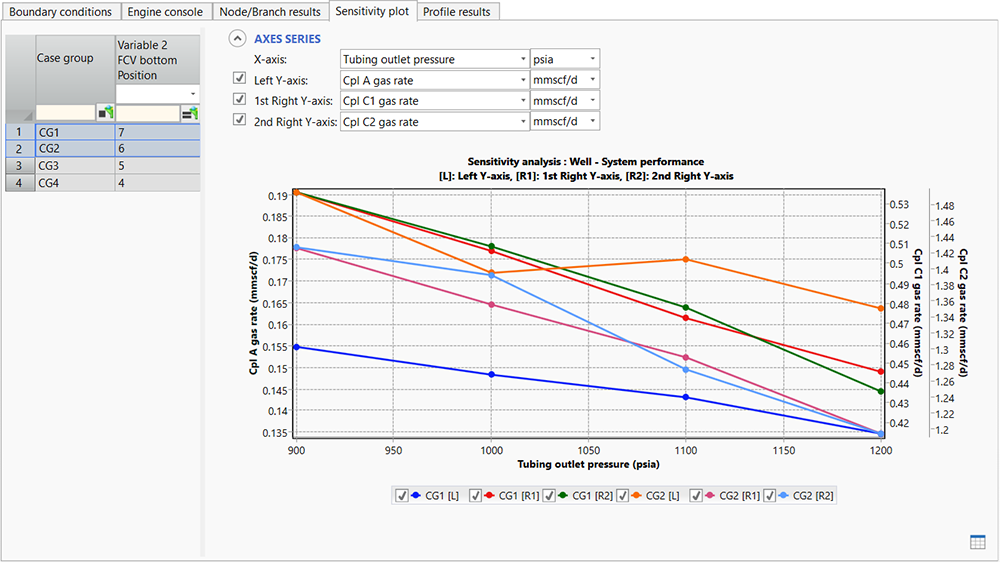
The advanced well sensitivity analysis, first introduced in 2026.1, has been enriched with several new capabilities to improve the workflow flexibility and reporting quality:
- Row-based workflow with up to 10 variables. Users can now configure each sensitivity scenario explicitly within a single row, enabling clearer setup and easier scenario management.
- Second right axis on the sensitivity tab plot. A new secondary right‑side Y‑axis allows reporting of an additional output parameter, improving comparative visualization of sensitivity results.
- Profile results tab. Users can now review and compare profile results for the entire system or selected branches, providing more detailed insight into system performance.
- Auxiliary results tab for multiple sensitivity cases. A dedicated view for simulation outputs based on spot report configurations, enabling streamlined comparison across sensitivity scenarios.
Upgrade of the Olga-S flow model to version 2026.1
The list of available flow correlations is updated to include Olga-S 2026.1. The main change between 2025.1 and 2026.1 is a new CO2 flow model, which is suitable for fluids with CO2 mole fraction greater than 90%. Olga-S two-phase and three-phase correlations have no improvement except for a few bug fixes.
Compatibility changes due to removal of SQL CE and other deprecated libraries
As part of our ongoing effort to enhance quality, performance, and security, several legacy components, such as SQL CE, have been removed from the Pipesim simulator installation package. Because of this change, models saved in Pipesim 2021.2 or earlier cannot be directly opened with the 2026.2 release. To use these models in 2026.2, they need to be opened and saved first using any version of Pipesim simulator from 2022.1 to 2026.1.
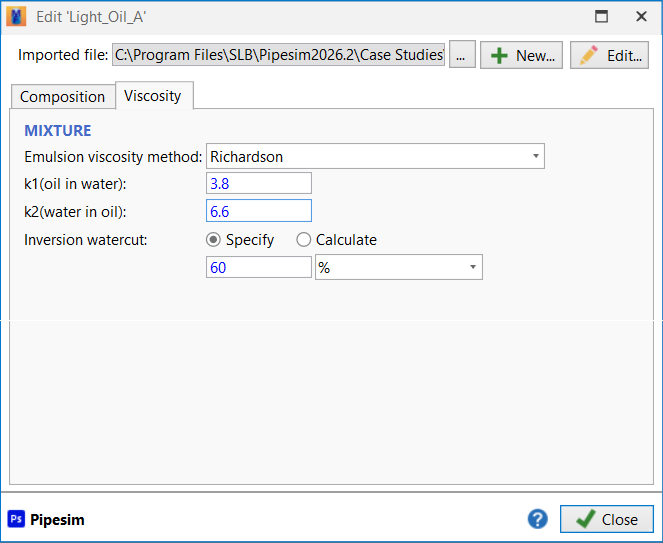
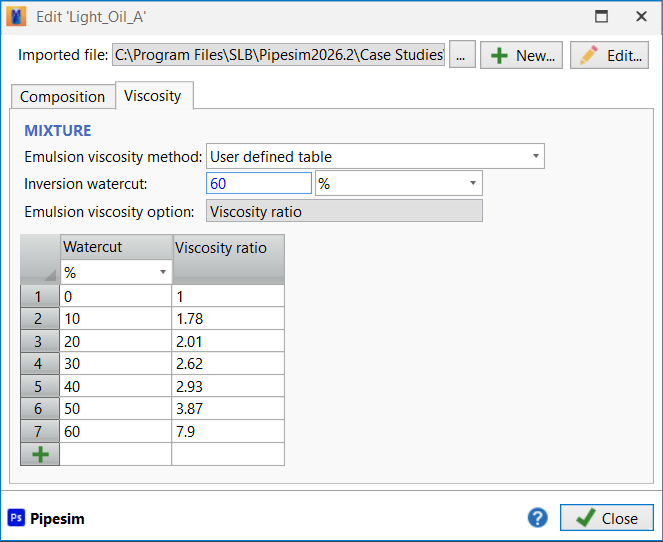
Enable emulsion options for Multiflash PVT files (*.MFL)
Previously, fluid modeling using Multiflash‑generated PVT files did not support emulsion correlation or the specification if inversion water cut. In Pipesim 2026.2 this limitation has been addressed, which improves flexibility when configuring emulsion behavior and ensures consistent functionality across different fluid modeling options.
PythonToolkit improvements
The following enhancements are available in Pipesim 2026.2 for the PythonToolkit:
- Support for well calibration task
- Support for selecting Olga-S 2026.1 flow model
- Support for emulsion correlation selection for Multiflash PVT file
- Support for getting network branch names for rate constraints in network simulation task
- Improved memory management to prevent memory leakage
- Python environment upgraded to 3.14
Fixed issues and minor enhancements in Pipesim 2026.2
Pipesim 2026.2 includes several bug fixes and improvements. Some of them are listed below.
- TUFFP correlation has been selected as the default correlation for all new models.
- All data grids have been improved to allow users to select and copy any column with headers.
- Update gun catalog service deprecation. The update catalog button has been removed from the interface.
- The GIS map has been enhanced to support proxy servers that require password authentication. Previously, only proxies without password authentication were supported.
- Clarified error message when hydrate subcooling temperature calculation is activated for a PVT file that does not contain hydrates formation curves. Previously, the message "Unrecognized package" was reported.
- Previously, the system results tab in P/T profile, nodal analysis and system analysis tasks did not support custom results columns configuration correctly. Results column selections were lost every time a new task run was performed, and users had to re-select columns. The issue has been fixed, and custom results column selections are now saved.
- Fixed issues with handling duplicate gas-lift injection rates for dual string well in network optimizer. Previously it could lead to an exception 'The input x values are not monotonically increasing'.
- For one component fluid, PH-Flash calculation for GERG and E300 PVT-packages has been improved to consider the transition between liquid and vapor. Previously, the simulation could stop with message 'PS_SERV_SD: too many failed flashes: see file .\XXFLSH.dbg'.
- When importing a well and choosing "Don't import the fluid. Use existing fluid", Pipesim incorrectly compared the fluid components between the imported and existing fluids. This produced a warning such as "The fluid was not imported because the following are different: fluid components". The issue has been fixed.
- The code handling PUSH directives has been fixed. Previously, this could result in an incorrect message 'The following PUSH directives were not processed'
- Warning message has been improved for ill-conditioned cases to highlight that specified outlet pressure cannot be used because pressure profile cannot go below zero. The different outlet pressure has been used to keep the pressure profile positive.
- In gas lift design, when using the redesign feature with a user-created valve, the valve column in the redesign table appeared blank. The issue has been fixed, and the user-created valves now correctly display their name on the redesign table.
- In auxiliary results of the system performance task, the report object list has been corrected and now displays only reports related to the selected branch. Previously, the list contained all reports, regardless of the branch selection.
- On the profile results tab, the "Type filter" dropdown stopped working after the text search box was used. The issue has been fixed and now type filter and text search box work correctly.
- In network simulation task with advanced well, on the node/branch results tab, the mass flowrate column showed empty values for source and sink equipment. The issue has been fixed.
- In advanced well, when end of plugged tail pipe split distributed completion, the flowrate from the bottom interval on node/branch results tab was incorrect. The issue has been fixed.
- When a network model contained disabled sink, the network simulation task has incorrectly recognized it, preventing the simulation from running. The issue has been fixed.
- When generating an injection VFP table for a well, the simulation could fail with a "Too many points found in routine CEP" error. This occurred because the VFP table generation was incorrectly using production-style settings instead of injection-style settings. The issue has been fixed.
- In the well model with open hole section, the option to calculate for the heat transfer coefficient could lead to the error message *** Required subcode missing : "NUMBER=". The issue has been fixed.
- Improved results processing extremely big models (over 15,000 components) with convergence problems. Previously, the results tab might not have appeared after the simulation was completed.
- Flowing bubble point pressure is not calculated for compositional fluid, and no values must be reported. In previous versions, another calculated variable has been reported that lead wrong data interpretation. The issue has been fixed.
- The well curve generation algorithm has been improved for gas lift wells. The guess injection rate was increased to support scenarios with high minimum gas flowrate. Previously, these cases led the error message “Calculated pressure is too low”.
- Incorrect logic due to failing calculation speed of sound near critical point has been fixed. Previously, it led to model convergence problems at certain input conditions with message "Insufficient pressure in section N".
- In the nodal analysis task for multilayer wells, mass flowrate report has been extended to support IPR curves by layer. Previously, only comingled mass flowrate was reported.
- When running a P/T profile simulation with spot report, the results were not displayed even the simulation was successfully finished. The results loading was stopped by DivideByZero exception that was not reported in console. The issue has been fixed and results are loading correctly.
- The system performance task has been fixed to support sensitivity with PVT and MFL files. In previous version, the advanced well sensitivity cannot be performed if fluid files are used.
- The documentation has been updated to include rod pump theory and equations and clarify WGR and watercut options for compositional fluid. PythonToolkit improvements:
- Creating a riser from PythonToolkit has been updated to properly pick up water temperature from environment. Previously, if horizontal distance in geometry was constant, the environmental data was not applied properly.
- The recirculating flow variable is now correctly reported in PTK simulation results for OneSubsea booster equipment. Previously, it was not reported for some scenarios.
- Method Add() has been fixed to add completion at the depth of liner. Previously, the error message "Could not find a casing to add the completion" has been reported.
- Improved error message when the Pipesim simulator model cannot be opened.
- Exposed ESPSLIPPAGEFACTOR simulation setting.
- Documentation has been updated.
Summary of functionality available on different platforms
Pipesim 2026.2 is 64-bit and runs natively on 64-bit platforms. The Pipesim Linux engine may be installed separately for use in coupled simulation with the Eclipse™ reservoir simulator and the Intersect™ reservoir simulator.
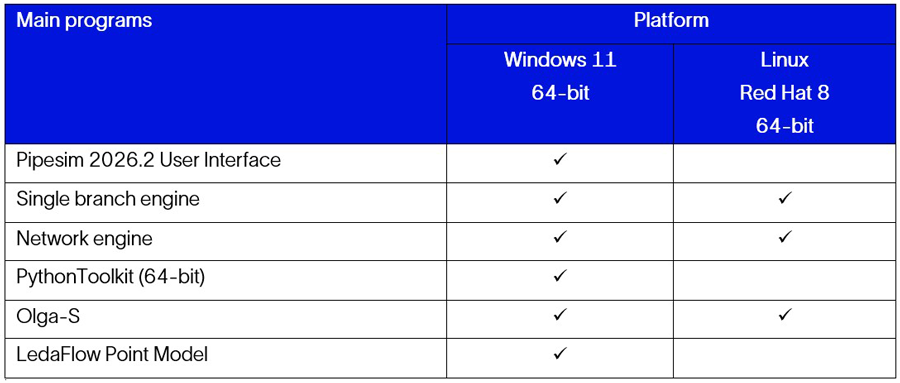
Note: User Access Control (UAC) Limitations – Pipesim simulator runs with the lowest available permission. The Windows 11 restrictions UAC applies to Pipesim simulator. For example, when UAC is activated, it prevents programs from writing to the Programs folder. If you cannot write to the Programs folder, do one of the following:
- Before running case studies, copy the files to a writeable folder, such as the Documents folder.
- Run Pipesim as an administrator.
Enhancements and changes to Pipesim simulator (besides various bug fixes) and documentation enhancements and improvements are summarized below. More details are available in the release notes included with the Pipesim installation kit or through the SLB Software Support Hub.
Pipesim 2026.1 (December 2025)
- 10-dimentional multi-test well model calibration
- Advanced well sensitivity analysis
- Branch rate constraints
- Counter flow temperature correction
- Upgrade to Multiflash 7.6
- PythonToolkit improvements
Pipesim 2025.2 (April 2025)
- Enable ESP head and rate derating factor as sensitivity variables
- Upgrade of the Olga-S flow model to version 2025.1
- Removal of old Olga-S correlations
- Upgrade to Multiflash 7.5
- Expose the effective horizontal well length
- Emulsion viscosity configuration improvements
- PythonToolkit improvements


