New Software Release

VISTA 2025 now available

Friday, 19 December 2025

Highlights from this release

VISTA™ desktop seismic data processing software provides data processing from early acquisition QC to final processing and interpretation of 2D and 3D seismic data. It supports data acquired on land, offshore, or from a vertical seismic profile (VSP), in all industry and manufacturer data formats.   

VISTA 2025 introduces a range of enhancements to improve user experience and efficiency. This release delivers new interactive windows, additional flow commands, and expanded options for existing flow commands. Numerous interactive windows now offer new functionality and overall workflows have been improved for greater stability, so users can efficiently navigate workflows and seamlessly evaluate datasets. For detailed information on key updates in surface seismic and vertical seismic profile (VSP) processing, please see the full release announcement below:  
Release updates

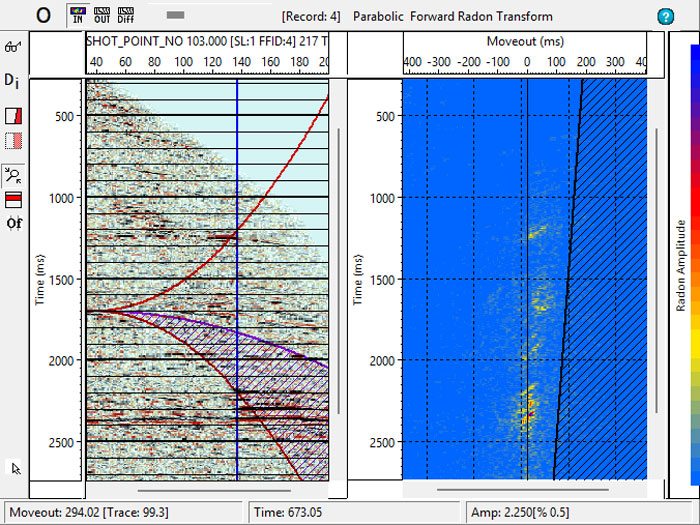
  • New interactive radon analysis window:
    • Interactively design and observe radon transformation of input data records.
    • Analyze moveout and mute parameters.
    • Preview multiple removal.
    • 2 displays: seismic and radon.
    • Observer inverse transform with muted multiples.
    • Save parameters.
    • Input parameters into flow command.


Vista 2025 release


  • New flow commands
    • Text write SEGD information using InfoSEGD.
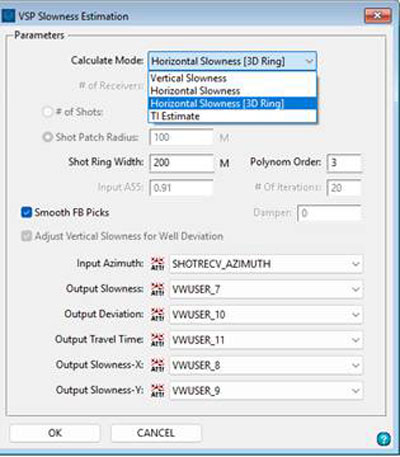
    • Compute vertical or horizontal slowness from direct arrivals using the VSP slowness estimation utilizing numerous calculation modes.


    Vista 2025 release


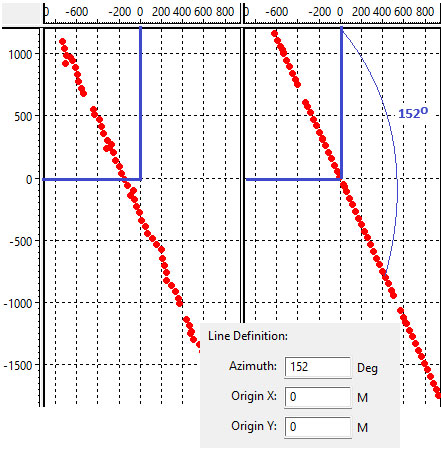
    • Project shot and/or receiver XY coordinates onto a straight line using ProjXY.


    Vista 2025 release


    • We have added new options for, and enhanced, the following flow commands: TextWrite, StrainVel, AngMute, AngLimit, ShotStk, RecvStk, HeadTrc, ReelWrite, BnrSEGY, TV_InvQ, AddNoise, RadonTrn, HRRadon, PSTM3D and PSTM2D, VSPGeom, VSPVertTm, VSPVelInv and VSPWaveSep.
       
    • Updated project data list:
      • Change dataset parameters and type through a right click menu.
      • Change type includes time, depth, interactive velocity analysis (IVA) (time seismic IVA, semblance, constant velocity stack [CVS]).
      • Changed behavior of mouse click on non-selected records.


    We have added new options and enhanced the following interactive windows:

    • Geometry window:
      • Import from Shell Processing Support (SPS) and SPS revision 2/1 and save both types during export.
      • Improved crooked line binning interface.
      • Improved auto estimation of bin size for 2D bin grid dialog.
      • Improved fold/offset calculation interface in 3D land geometry.
    • 3D seismic cube display:
      • Users can synchronize multiple 3D cube displays.
      • Load multiple frequency slices.
      • Improved horizon display.
      • Improved display of 2D stacks and time-slice datasets.
      • New hotkeys, and updated right mouse button (RMB) menu.
      • Added current inline, xline, time slice to saved orientation file.
    • Azimuthal analysis display:
      • Set header start value before plotting.
      • Display additional header item in the background.
      • Calculate and display LSQ fit of ellipse or circle or line.
      • Updated dialogs and RMB menu.
    • Post stack Q estimation:
      • Fixed bugs with onscreen Q application.
      • New options dialog.
    • Seismic window display:
      • New option to import VSP first breaks from text file.
      • Improved color-bar handling via RMB and hotkeys in frequency and wavenumber (FK) analysis window.
    • Attribute window:
      • VSP data option: display well head on geometry map.
      • Station location prediction.
        • Auto-synchronized spreadsheet with all views.
        • Auto-set mouse tracking (depending on mode).
        • Set manual move vectors color and line size.
        • Remove manually moved vectors on auto-calculate.
        • Display selected vector in color on geometry map.
        • Include number of picks into report.
    • AVO/AVA 2D modeling:
      • Updated dialogs, messages and toolbars.
      • Added editable elevations from MSL to model spreadsheet.
      • Color filling columns in the model spreadsheet.
      • Improved output headers information.
      • Fixed sorting boundaries in the spreadsheet.
      • Fixed graph model display and tracking.
      • Save reflection amplitudes to headers.
      • Display impedance in graph view.
      • Add noise to output, limit angles.
      • Load VISTA software velocity files.
      • Use approximation of Zoeppritz equations.
    • Interactive velocity analysis:
      • Users can save mutes to Omega™ seismic data processing software mute file format.
      • Users may choose a finer sample rate when picking, VISTA software allows for smaller gaps between picks for high precision data.
      • Improved 2D multiline picking; improved setting the start, end and increment for numerous 2D lines.
      • MVFS option automatically finds matching velocity files.
      • Minimized error reporting for multiple 2D lines without binning information.
      • Auto pick all 2D surveys.
      • Save all 2D velocities.
      • Numerous fixes.
      • Velocity surface map window; multiple 2D lines initialize to the same velocity control size.
    • Stack and pre-stack time migration (PSTM) analysis:
      • PSTM migration analysis | Eta analysis; reworked for 2D and 3D cases​.
      • Eta analysis on multiple velocity control points.
      • Create composite stack in angle and Eta windows.
      • Optionally adjust velocities for eta on saving.
      • Receive broadcast from surface map in 2D.
      • Broadcast from composite stack to panel view.
      • Fixed display issues for resize and toggling options.
      • added parameters to Image options dialog.
      • Fixed initial overlay issue in composite stack.
      • Enabled broadcast from composite stack to panel view.
      • Added saving 3D eta picks.
      • Adjust velocities for eta when saving.
    • VSP Q attenuation:
      • New option—load drift curve from sonic calibration and display in CA window.
      • New option—display cross-hair and track from CA or log windows to frequency and seismic windows.
      • New display options dialog for various types of lines and font.
      • New option to toggle mouse modes in CA window.
      • Color-bar selection via RMB, display selected VSP profile name.
    • VSP well look ahead window:
      • Auto-update wavelet view when wavelet reloads.
      • Improved RMB menus and dialogs.
    • 2D/3D VSP model build window:
      • Added calculated density in the layers dialog spread-sheet.
      • New options to save down-going and reflection rays lengths to headers.
      • New option to measure azimuth and length on the surface map in geometry view.
      • Improved ray tracing.
    • 2D VSP common depth point (CDP) mapping window:
      • New option adjusts VSP CDP line display parameters.
    • VSP velocity profile window:
      • New view displays first break picking (FBP) time difference or inversion misfit.
      • New hotkey to toggle seismic data display.
      • Smooth velocity inversion:
        • New options, updated dialog.
        • RMS misfit.
        • Vel-variation.
        • Recalculate inversion on FBP auto-edit.
        • Bug fixes.
    • Users can open any VSP window outside of the main VISTA window.
       
    • Use and display revers LAS files.
       
    • Protect from crashes for non-modal dialogs.
       
    • Menus now fully disable when modal dialog displays.
       
    • VISTA software program settings, program log tab includes new information and options.
       
    • VISTA top menu bar:
      • Removed font and edit menus.
      • Font moved to project settings dialog.
      • Project related items moved from file menu to project menu.


    Users

    Geophysicists involved in field QC and processing of 2D and 3D seismic data acquired on land, offshore, or through VSP