Symmetry 2026.1 now available
Wednesday, 11 March 2026
Symmetry™ process simulation software helps users model process workflows in a single collaborative environment, while integrating pipelines, pipe networks, facilities models, and flare systems to enable consistent thermodynamics and fluid characterization across the whole system. With Symmetry software, users can switch between steady-state and dynamic modeling, optimize processes in upstream, midstream, downstream, and new energy sectors, and maximize the total value of the asset.
Symmetry 2026.1 introduces a range of enhancements, including integration with an AI-based Symmetry assistant—Tela™ for Symmetry—a native implementation of the EOS-CG and GERG-2008 thermodynamic models, a new diagnostics feature for dynamics, improvements to OPC connectivity and a case migration helper tool to support transition to the built-in process flow diagram (PFD) tool, among other additions.
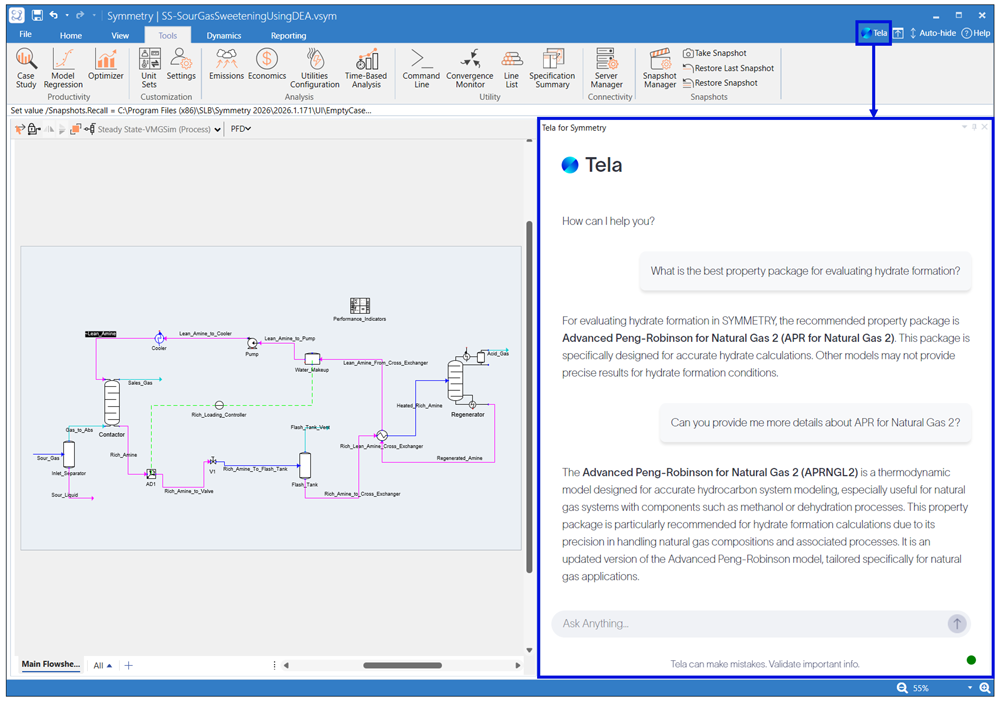
Redefine the way you interact with your simulator. Symmetry 2026.1 includes seamless integration with Tela AI assistant, the domain-oriented AI technology from SLB, offering the ability to drive simulation, physics, and machine learning tools; a faster and more intuitive way for engineers to access the knowledge they need to achieve their simulation goals. In this first deployment, Tela for Symmetry supports users asking questions about Symmetry software unit operations, calculations, variables, and workflows, and receive guidance from the most relevant sections of the Symmetry software manual, knowledge base, and relevant application or manual examples. This new capability eliminates the inefficiencies of searching through multiple documents or waiting for support or SME input. Please note that Symmetry for Tela is a separate software package available through the Software Download Center (SDC) and must be installed and licensed independently, but once installed, it integrates seamlessly with Symmetry software.
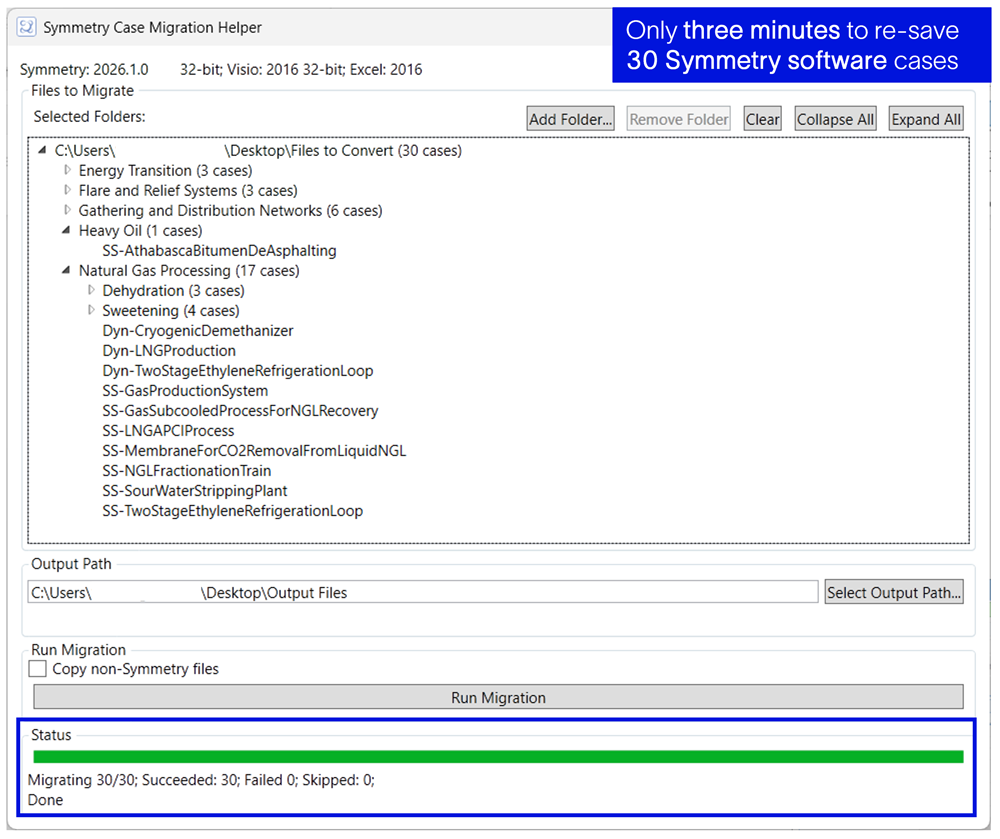
Symmetry 2026.1 includes a case migration helper utility that enables users to open and save multiple cases in bulk, through an automated workflow. This helps ensure that all necessary PFD information is saved with the simulation file, providing a smoother and more reliable transition when cases are later opened in the built-in PFD tool. Because the case migration helper relies on Microsoft Visio, a licensed installation is still required, and the feature is intended to support users as they prepare their transition to the built-in PFD. Beginning with Symmetry 2026.3, the built-in PFD will be the default user interface selected during installation. Users may continue to switch to the Visio-based PFD in their settings if desired; however, future development efforts will focus exclusively on enhancing the experience of using the built-in PFD tool. Additional details regarding this change will be communicated at a later stage.
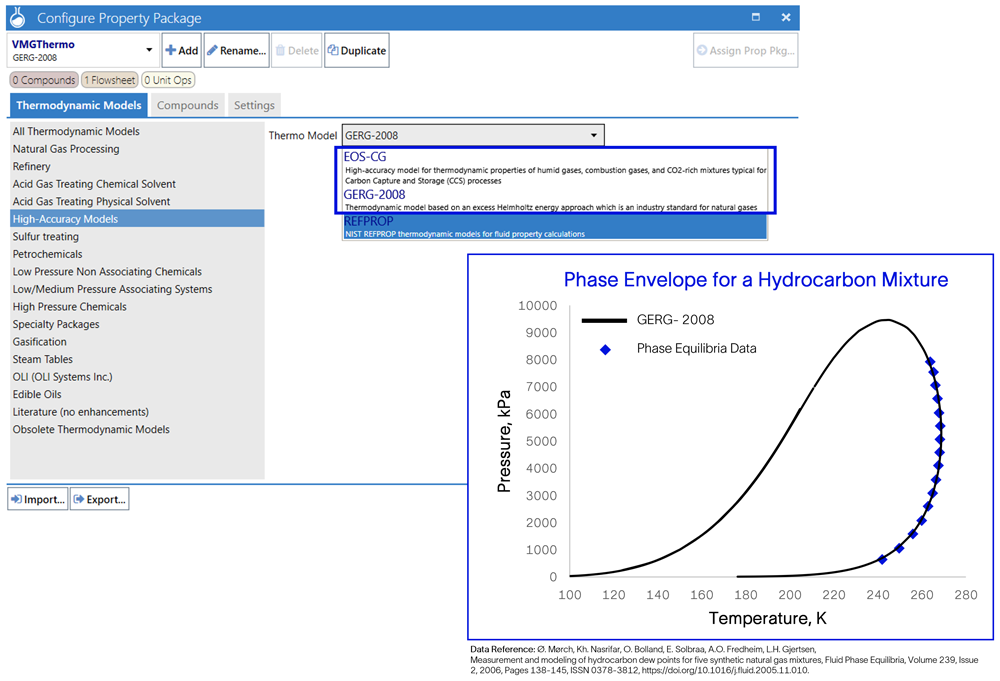
Symmetry 2026.1 includes a native implementation of the EOS-CG and GERG-2008 thermodynamic models. The new implementation supports multithreading and provides better control over convergence behavior, which is especially useful for dynamic simulations. EOS-CG is a standard approved model for carbon capture and storage (CCS) applications and gives users the flexibility to represent a wide range of CCS technologies. Note that both EOS-CG and GERG-2008 are integrated into Symmetry Fluids Engine.
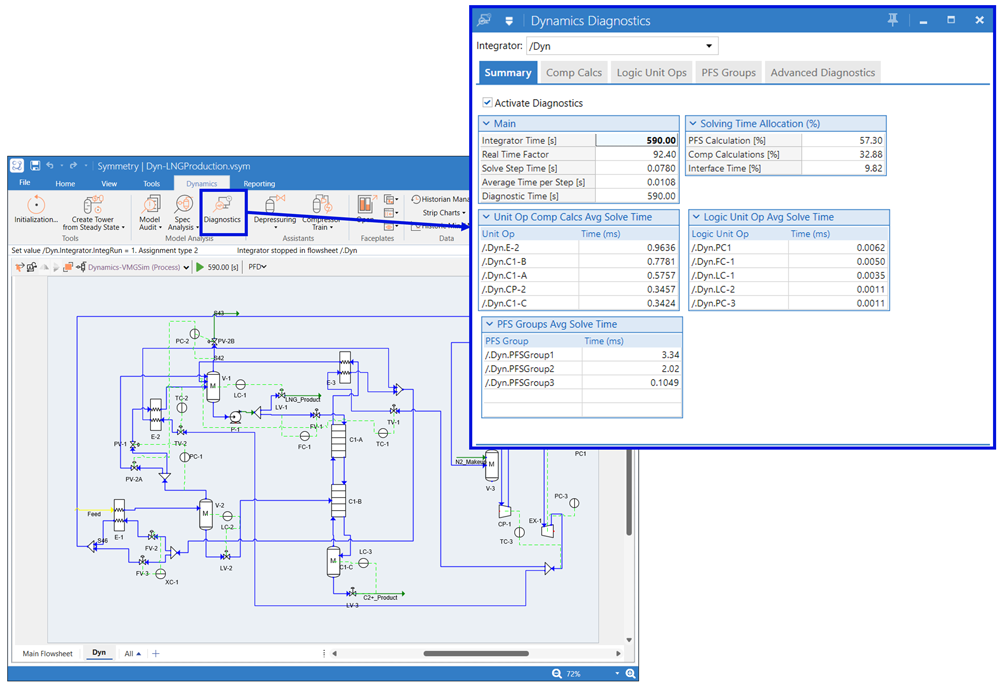
A powerful new diagnostics feature is available in this release, bringing a major boost to dynamic simulation workflows, especially for users tackling complex models and operator training simulator projects. This enhanced tool delivers precise, in-depth insights that make it easier to troubleshoot simulation cases, optimize performance, and quickly identify the calculations or unit operations that may need additional attention.
The diagnostics engine automatically highlights slow performing unit operations and pinpoints control loops or logic elements that may be contributing to performance slowdowns. With this level of visibility, users can rapidly uncover and resolve bottlenecks, significantly improving the speed and efficiency of their simulations.
In addition, the feature allows users to track variables throughout the run, enabling deeper analysis of system behavior at key points in the simulation. This combination of performance insights and real-time tracking gives users a powerful toolkit to streamline workflows and elevate the quality of their dynamic models.
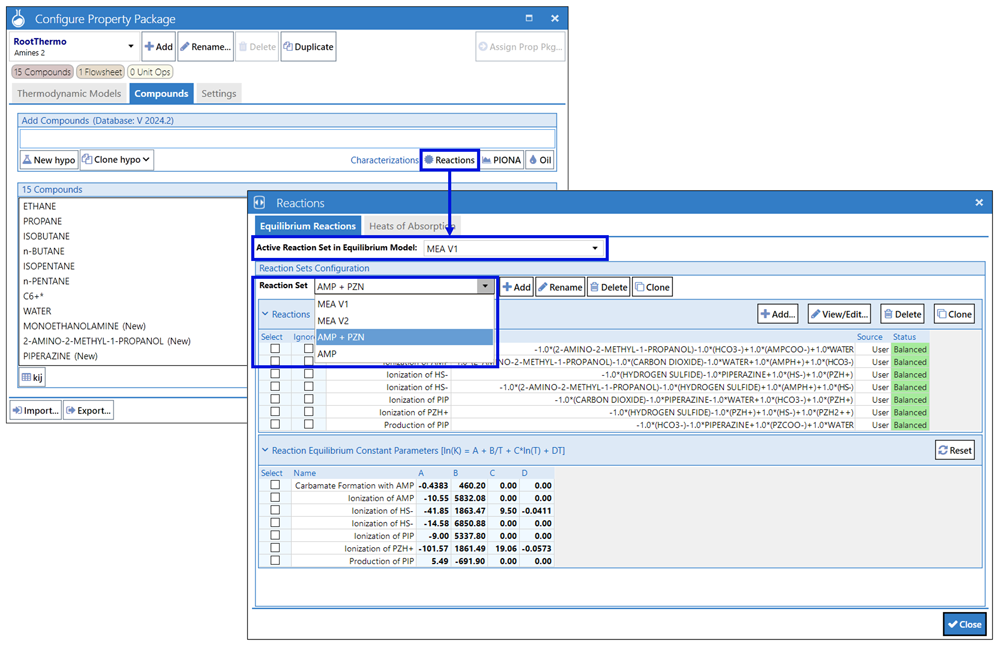
The Amines 2 property package now allows users to define multiple equilibrium reaction sets, providing a flexible and convenient way to customize the reaction system.
These reaction sets can be created and stored within the case, enabling engineers to compare and assess how different reactions impact the overall process.
As part of ongoing maintenance and performance improvements, the OPC feature has been enhanced to support more efficient data exchange, reducing redundant information being stored or transferred. Updates to the interaction of the process calculator and data tables with the OPC server results in smoother and faster communication. Logging has also been refined so that key transactions are now captured by default in the console, including values received from both the simulator and the OPC client.
Beginning with the release of Symmetry 2027.1 (Q1 2027), the 32-bit installer will no longer be provided. All users will need to install the 64-bit version of Symmetry to access the latest release. This change supports our ongoing commitment to improving performance, strengthening security, and ensuring compatibility with modern hardware and operating systems.
If you are currently using a 32-bit version of Visio, when upgrading to Symmetry 2027.1 or later, you will need to upgrade to the 64-bit version or transition to the built in PFD tool which is our proprietary PFD tool and requires no additional licensing, removing the dependency on Microsoft Visio®. You may continue using the 32-bit version of Symmetry software until then.
If you are aware of existing workflows that depend on the 32-bit version of Symmetry software and may prevent you from transitioning to 64-bit, please contact your SLB point of contact or submit a support ticket as soon as possible.


